Home / Buying Guides / 3D scanners under $1000
Buying guide · updated 2026-10-08 · The Real Deal Meter team
3D scanners under $1000 compared

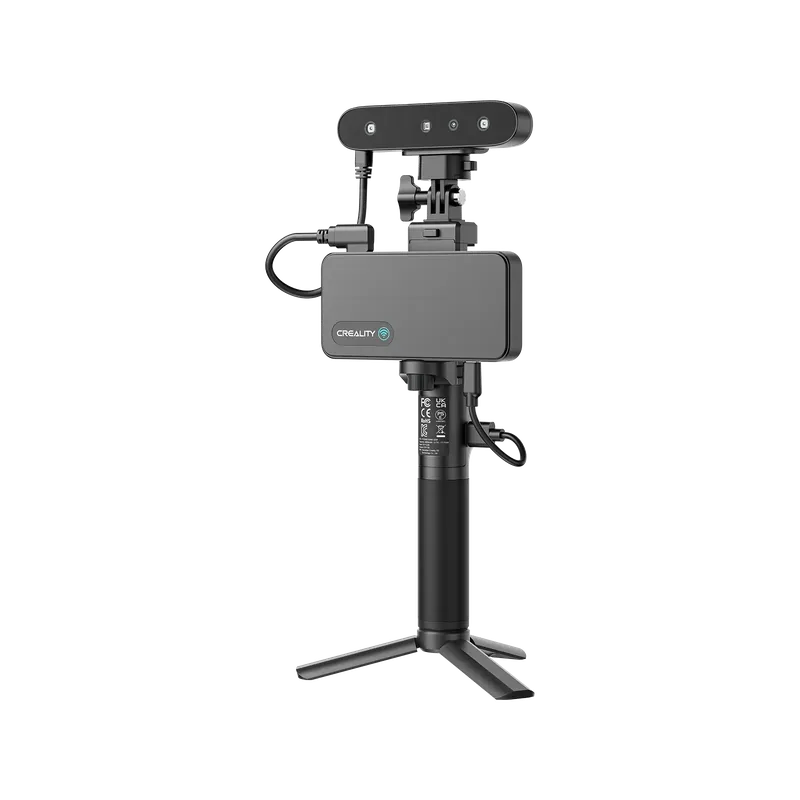
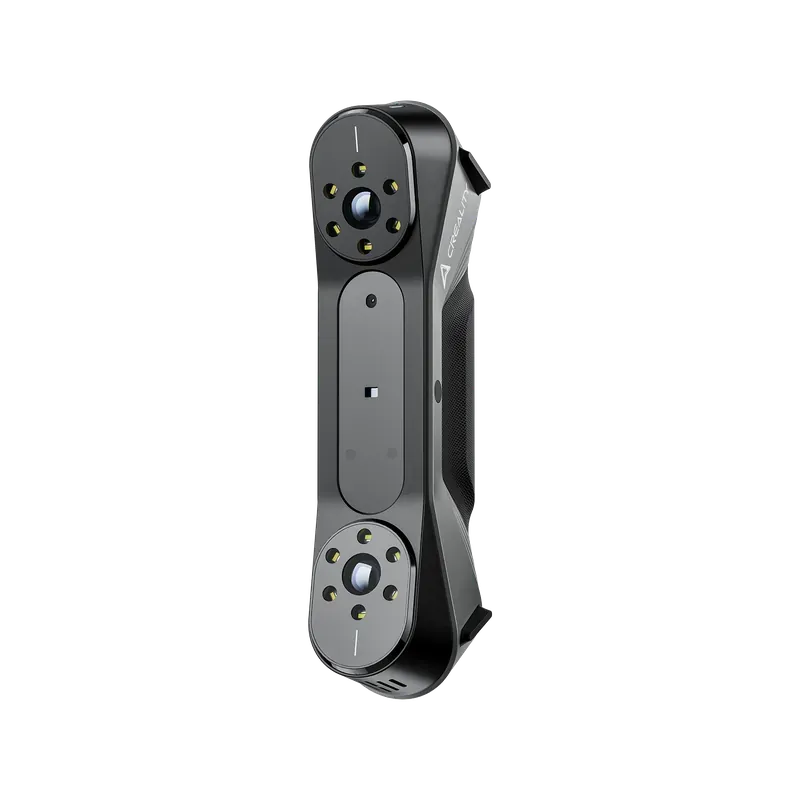
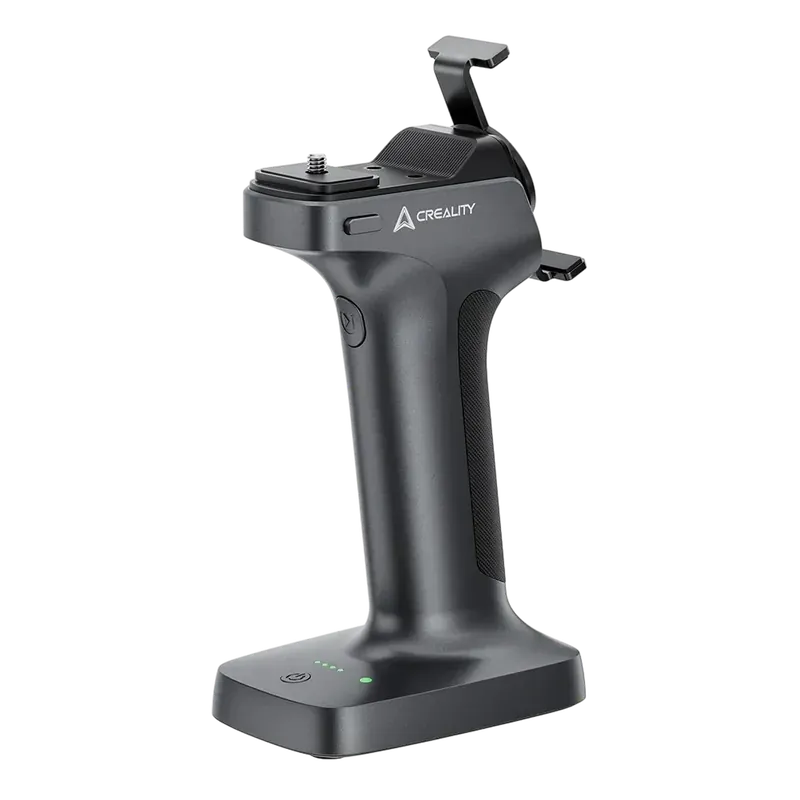
Three things from Creality’s own store, and only two of them are scanners. The Ferret Pro is a light handheld scanner that can run from a phone; the CR-Scan Raptor adds seven blue laser lines, rated to 0.02 mm, and wants a strong PC and marker dots on the work. The third, the Scan Bridge, is a battery handle that takes the Raptor off its cables — it does nothing for the Ferret Pro. Which to buy comes down to how small, and how exact, the things you scan are.
| Product | Price | ||
|---|---|---|---|
| Scans from a phone | Creality Ferret Pro 3D Scanner A handheld scanner rated at 0.1 mm that runs from a recent phone or a computer over its own Wi-Fi 6 bridge, in colour. Creality aims it at objects from 15 cm to 2 m; Notebookcheck found small ones a struggle. 3 checks since Sep 23 · low $299.00 | ||
| For parts that must fit | Creality CR-Scan Raptor 3D Scanner Seven blue laser lines rated to 0.02 mm for small, detailed parts, and infrared for big ones without markers. It needs a strong PC — Creality recommends an Nvidia card with 6 GB — and marker dots in laser mode. 5 checks since Sep 23 · low $879.00 | ||
| For the Raptor, not the Ferret | Creality Scan Bridge A battery grip with Wi-Fi 6 that powers the Raptor and sends its data to the computer, with your phone clipped on as the screen — more than three hours a charge by Creality’s figure. The Ferret Pro has a bridge of its own. 3 checks since Sep 23 · low $299.00 |
Prices last checked 2026-10-08. Each one is re-checked daily and this table is rebuilt when any of them moves.
More 3D scanners at the stores we work with ↓
Paid links · We may earn a commission if you buy through them.Size and exactness decide it, not the box
A handheld scanner works out where it is from what it sees, frame by frame, and the two here do it differently. The Ferret Pro lines its frames up by the object’s shape, its texture or marker dots 1. Creality pitches it at objects from 15 cm to 2 m — cars, car parts, tyres 2 — and its own guide suggests objects more than 20 cm across with plenty of shape 1.
The Raptor has two modes. Its seven blue laser lines are for small, detailed parts, from 5 mm up, at 15 to 40 cm from the object, and they keep track by reflective marker dots; its infrared mode reaches a metre away and can follow an object’s own shape without markers 3. CNC Kitchen, in a video Creality sponsored, explains the trade: the thin laser lines capture far more detail than the infrared, but their field is small, so a bigger part needs a lot of markers 4.
So start with what you will scan. A bust, a helmet, a bumper or a person is the Ferret Pro’s range. A bracket, a knob or a gear you want to reprint so that it fits is a job for the Raptor’s laser mode.
- CR-Scan Ferret Pro - Manual (Quick Start Guide) Creality Wiki — the maker's guide: accuracy 0.1 mm; working distance 150-700 mm; minimum object 50 x 50 x 50 mm in marker mode; up to 30 fps; alignment by geometry, markers or texture; colour texture; Wi-Fi 6 wireless bridge in the box; iPhone 11 or later, Android 10 or later with 8 GB RAM, or a PC with an 8th-gen Core i5 and 8 GB; recommends objects 'above 20cm' with rich geometry; no turntable in the box
- CR-Scan Ferret Pro 3D Scanner Creality — the maker's page: 'For medium to large objects, Ranging from 15cm to 2meter'; black and metal objects 'Without scanning spray' (cars after marking the surface); 2MP colour camera; 105 g; works in sunlight under 30,000 lux
- CR-Scan Raptor 3D Scanner CrealityStore — the maker's store page: blue 7-line laser, accuracy up to 0.02 mm @ 100 mm, objects from 5 mm, working distance 150-400 mm, marker alignment; NIR structured light, up to 0.1 mm, 170-1000 mm, markers, geometry or texture; 'Accuracy is evaluated in laboratory conditions (measurement object is 100mm sphere pair)'; black and metal objects without spray; Class I laser; 372 g; Windows and macOS
- 10 Tips for Better 3D Scans (feat. Creality CR-Scan Raptor) CNC Kitchen — a video and post Creality sponsored (2024-09-14): about 0.3 mm deviation per metre in a ball-bar test, 'very usable for reverse engineering'; thin laser lines capture more detail than NIR but need many markers on bigger parts; struggled on an ultrabook without a dedicated GPU; scanned machined aluminium without spray; compare accuracy with a printer's nozzle size
0.02 mm is measured in a lab, on two spheres
Creality rates the Raptor at up to 0.02 mm in laser mode and the Ferret Pro at 0.1 mm 1 2. The Raptor’s footnote says how its figure is made: in laboratory conditions, on a pair of 100 mm spheres, and temperature and vibration can change it 1. Artec, which makes professional scanners, puts it more generally: most specifications list single-scan accuracy, and accuracy falls on larger objects and at longer range 3.
Two testers measured instead. Notebookcheck scanned a 150 mm gauge block with the Ferret Pro and got 149.67 mm, a third of a millimetre short 4. CNC Kitchen’s ball-bar test of the Raptor came to about 0.3 mm per metre, which he judged very usable for reverse engineering 5. His yardstick is the nozzle of the printer the scan will be printed on 5: on a figurine a few tenths of a millimetre disappear, and on a part that has to fit they are the difference.
- CR-Scan Raptor 3D Scanner CrealityStore — the maker's store page: blue 7-line laser, accuracy up to 0.02 mm @ 100 mm, objects from 5 mm, working distance 150-400 mm, marker alignment; NIR structured light, up to 0.1 mm, 170-1000 mm, markers, geometry or texture; 'Accuracy is evaluated in laboratory conditions (measurement object is 100mm sphere pair)'; black and metal objects without spray; Class I laser; 372 g; Windows and macOS
- CR-Scan Ferret Pro - Manual (Quick Start Guide) Creality Wiki — the maker's guide: accuracy 0.1 mm; working distance 150-700 mm; minimum object 50 x 50 x 50 mm in marker mode; up to 30 fps; alignment by geometry, markers or texture; colour texture; Wi-Fi 6 wireless bridge in the box; iPhone 11 or later, Android 10 or later with 8 GB RAM, or a PC with an 8th-gen Core i5 and 8 GB; recommends objects 'above 20cm' with rich geometry; no turntable in the box
- 3D scanning accuracy, precision & resolution: What's the difference? Artec 3D — accuracy is how close the data is to real dimensions; most specifications list single-scan accuracy; volumetric accuracy falls for larger objects; accuracy and resolution drop at longer range
- 3D-Scanner zum kleinen Preis: Was der Creality Ferret Pro kann Notebookcheck (German) — hands-on test, sample from Creality (2026-07-16): good on larger objects and faces, small objects 'nicht mehr sinnvoll'; reflective or transparent objects not captured; a 150 mm gauge block measured 149.67 mm (0.335 mm off); texture quality mediocre; 'only really' worth buying with an Nvidia GPU
- 10 Tips for Better 3D Scans (feat. Creality CR-Scan Raptor) CNC Kitchen — a video and post Creality sponsored (2024-09-14): about 0.3 mm deviation per metre in a ball-bar test, 'very usable for reverse engineering'; thin laser lines capture more detail than NIR but need many markers on bigger parts; struggled on an ultrabook without a dedicated GPU; scanned machined aluminium without spray; compare accuracy with a printer's nozzle size
What a scanner cannot see, and what it needs to run
Neither scanner sees everything. Light passes through transparent parts and glances off shiny ones in one direction, and a dark part sends too little back, which is why scanning spray exists; semi-transparent 3D prints are a common case, and the error can reach 0.2 mm or more 1. Creality says both scanners take many black and metal objects without spray 2 3, and CNC Kitchen scanned machined aluminium with the Raptor without any 4; Notebookcheck found that the Ferret Pro simply did not capture reflective or transparent objects 5.
The other half is the computer. The Ferret Pro runs from an iPhone 11 or later, an Android 10 phone with 8 GB of memory, or a PC with an 8th-generation Core i5 and 8 GB 6 — though Notebookcheck’s verdict was that it really only makes sense with an Nvidia graphics card 5. The Raptor has no phone mode: Creality recommends a Core i7, an Nvidia card with 6 GB and 16 GB of memory, and its laser mode needs marker dots on anything large 7. CNC Kitchen struggled with it on a laptop without a graphics card 4. Neither box includes a turntable 6 7.
- 3D scanning spray: a complete overview Aniwaa — spray is for transparent, shiny or dark parts: light passes through transparent ones, reflects in one direction off shiny ones, dark ones need longer exposure; semi-transparent 3D prints are a common case; errors 'of 0.2 mm or more'
- CR-Scan Ferret Pro 3D Scanner Creality — the maker's page: 'For medium to large objects, Ranging from 15cm to 2meter'; black and metal objects 'Without scanning spray' (cars after marking the surface); 2MP colour camera; 105 g; works in sunlight under 30,000 lux
- CR-Scan Raptor 3D Scanner CrealityStore — the maker's store page: blue 7-line laser, accuracy up to 0.02 mm @ 100 mm, objects from 5 mm, working distance 150-400 mm, marker alignment; NIR structured light, up to 0.1 mm, 170-1000 mm, markers, geometry or texture; 'Accuracy is evaluated in laboratory conditions (measurement object is 100mm sphere pair)'; black and metal objects without spray; Class I laser; 372 g; Windows and macOS
- 10 Tips for Better 3D Scans (feat. Creality CR-Scan Raptor) CNC Kitchen — a video and post Creality sponsored (2024-09-14): about 0.3 mm deviation per metre in a ball-bar test, 'very usable for reverse engineering'; thin laser lines capture more detail than NIR but need many markers on bigger parts; struggled on an ultrabook without a dedicated GPU; scanned machined aluminium without spray; compare accuracy with a printer's nozzle size
- 3D-Scanner zum kleinen Preis: Was der Creality Ferret Pro kann Notebookcheck (German) — hands-on test, sample from Creality (2026-07-16): good on larger objects and faces, small objects 'nicht mehr sinnvoll'; reflective or transparent objects not captured; a 150 mm gauge block measured 149.67 mm (0.335 mm off); texture quality mediocre; 'only really' worth buying with an Nvidia GPU
- CR-Scan Ferret Pro - Manual (Quick Start Guide) Creality Wiki — the maker's guide: accuracy 0.1 mm; working distance 150-700 mm; minimum object 50 x 50 x 50 mm in marker mode; up to 30 fps; alignment by geometry, markers or texture; colour texture; Wi-Fi 6 wireless bridge in the box; iPhone 11 or later, Android 10 or later with 8 GB RAM, or a PC with an 8th-gen Core i5 and 8 GB; recommends objects 'above 20cm' with rich geometry; no turntable in the box
- CR Scan Raptor - Product Manual Creality Wiki — the maker's manual: recommended 'i7-Gen7 CPU, Nvidia graphics card (6GB VRAM), 16GB memory or higher'; blue light mode needs reflective marker points; markers on the object when it is large; glass calibration board, markers and a scanning pad in the box, no turntable
The Scan Bridge is for the Raptor
The Raptor runs on a power cable and a USB cable to the computer. The Scan Bridge replaces both: a grip with two 5,000 mAh batteries, more than three hours of scanning by Creality’s figure, Wi-Fi 6 to an adapter in the computer, and a magnetic holder that turns your phone into the scanner’s screen 1. The computer still does the work, and it has to stay within easy reach of the signal 1. It comes in two versions; the one we list is for the Raptor series and Creality’s Sermoon S1 2. The Ferret Pro does not use it: its own wireless bridge is in the box 3.
We found no review of the bridge with a Raptor. Two reviewers used it with the Sermoon S1: Tom’s Hardware liked the pistol grip it gives the scanner 4, and TechRadar called it a worthwhile addition for professional use 5.
- Scan Bridge User Manual Creality Wiki — the maker's manual: a data bridge with Wi-Fi 6 and a battery that sends the scanner's data to a computer or phone; for CR-Scan Raptor, RaptorX and Otter; two 5000 mAh batteries, 'more than 3 hours' of scanning; 30 W charging; a phone as the scanner's display; up to 50 fps in laser mode; 444 g; no charger in the box
- Creality Scan Bridge CrealityStore — the maker's store page: two versions, 'Scan Bridge for Sermoon S1& Raptor Series' and 'Scan Bridge for Otter' - 'Please pick your correct version'
- CR-Scan Ferret Pro - Manual (Quick Start Guide) Creality Wiki — the maker's guide: accuracy 0.1 mm; working distance 150-700 mm; minimum object 50 x 50 x 50 mm in marker mode; up to 30 fps; alignment by geometry, markers or texture; colour texture; Wi-Fi 6 wireless bridge in the box; iPhone 11 or later, Android 10 or later with 8 GB RAM, or a PC with an 8th-gen Core i5 and 8 GB; recommends objects 'above 20cm' with rich geometry; no turntable in the box
- Creality Sermoon S1 Review: Accessible 3D Scanning Tom's Hardware — a review of another Creality scanner (2026-04-06): the Scan Bridge 'gives the S1 a comfortable pistol grip' and a rechargeable battery where the scanner alone needs a power cord
- Creality Sermoon S1 review TechRadar — a review of another Creality scanner, with the Scan Bridge (2026-04-17): the handle is 'a worthwhile addition if you are using the scanner professionally'; wired USB 'limits freedom'
What these prices mean
Each price here is the one we last checked on that product’s own page, and each page says the date. All three are Creality’s own prices, read every day from the product feed Creality gives its affiliates, and none of them has moved since we started reading it on September 23, 2026. We have not seen any of them charged at its list price.
The Ferret Pro we list is a flash-sale page; Creality’s regular Ferret Pro page asked $359 on October 8, 2026 1. For scale on the Raptor, All3DP reported its launch price as $1,599 in April 2024 2.
- CR-Scan Ferret Pro 3D Scanner CrealityStore — Creality's regular store page: $359.00, compare-at $449.00, on 2026-10-08; the listing we track is a limited flash-sale page
- Creality Also Announced a 'Metrology Grade' 3D Scanner This Week All3DP — news, not a review (2024-04-11): blue laser mode tracks by markers only, infrared adds geometry and features; large projects mean carrying a laptop; launch price $1,599
More at the stores we work with
15 more 3D scanners at $1000 or less, besides the ones compared above: each store’s own product at its own price, linked straight to the store. We have not compared these, and their prices are not ones we check.
Creality 15
Creality’s own prices, read Oct 8, 2026 · Creality's US store does not say where orders ship from


 6mm Scanner Reflective Markers for 3D Scanners$12.99 Creality list $79.00See it at Creality → Paid link


All 15 at Creality
 High-Precision Calibration Board for Raptor Pro, Sermoon S1, Sermoon P1$109.05See it at Creality → Paid link
 Creality CR-Scan Ferret SE 3D Scanner Free Shipping & 1-Year Warranty$299.00 Creality list $319.00See it at Creality → Paid link


More at Creality → Paid link
The stores’ prices are their own, read from the product feed each gives its affiliates and re-read every day; we have not checked them the way we check the deals we track. Stores in alphabetical order, each cheapest first — never in the order of what we earn.
Paid links · Every store link here goes to the store through our affiliate network, and we may earn a commission — see Disclosure.Prices are what we last checked on each product's own page — follow a link for the current price and the date it was verified. Every outbound link here is an affiliate link; see Disclosure.
More buying guides → See every checked deal →© 2026 Real Deal Meter · Quote us with a link back · Copyright & reuse